Alter now supports Agent Skills
He got game, we got skills


Samuel ROY & Olivier Legris
January 30, 2026

Hey everyone,
This week, Alter evolves. You told us you wanted more power, more customization, more automation. We listened.
Introducing Agent Skills: the game-changer that lets you truly extend Alter's capabilities and shape your AI assistant to your exact needs. Alter always had the brain, but now it has the skills!
Cherry on top, we've implemented a one-click install skill registry to make it easy for you.

NoCPU has used one of his three wishes
What Are Agent Skills?
Agent skills are powerful extensions that allow Alter to perform a wider range of tasks by integrating with various tools and services. Think of them as specialized modules you can plug into Alter, enabling it to:
Access external data: Fetch real-time information from the web.
Perform complex operations: Execute custom scripts or interact with APIs.
Automate workflows: Handle tasks that require multiple steps and external interaction.
These are industry-standard skills, meaning you can use the same skill definitions you might find in platforms like OpenAI or Claude, now directly within Alter.
Real Example: Your AI News Briefing
In our demo video, we show how to create a personalized AI news briefing. With Skills, Alter can:
Retrieve news from various RSS feeds.
Organize articles by topic.
Provide direct links to source content.
Imagine getting a custom, AI-generated summary of your industry news every morning, without lifting a finger. That's the power of skills.
How to Get Started
The Agent Skill Registry in Alter
Open Alter's Tool Manager: Navigate to the new "Agent Skills" category.
Browse & Discover: Find skills that match your needs.
Inspect Skills: Before enabling, always review a skill's description and its potential actions. Skills can range from simple prompts to complex operations that interact with your files, or even run scripts on your machine.
Enable & Activate: Add the desired skills to your desired Workspace(s).
We also recommend looking at Anthropic’s repo for best-in-class skills
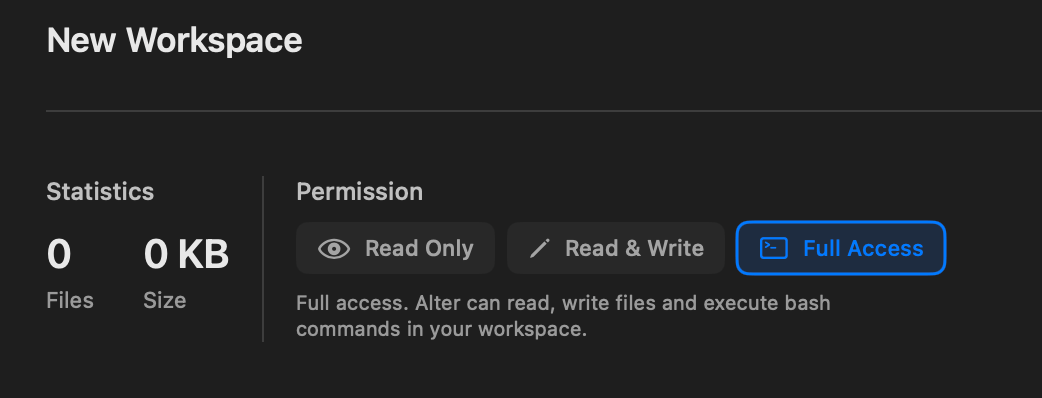
Most of the time, skills will be required to have full access to work optimally.
Skills are very powerful
Skills are a powerful addition to Alter, significantly extending its capabilities from executing simple prompts to performing complex operations like running scripts and managing files on your computer.
However, this inherent power makes careful inspection critical before enabling any skill.
As skills can demand extensive access to your workspace and may execute code or modify your system, it's essential to review their functions and dependencies thoroughly. This due diligence ensures you understand their exact actions and any necessary prerequisites, thereby safeguarding your system while fully leveraging Alter's enhanced potential.
How Alter is protecting you from malicious skills
That's why we've built a robust security framework, ensuring you're always in control:
Workspace sandbox Environment: When using a skill in a workspace, it operates within its own secure "sandbox." This means a skill can only touch the specific folder(s) you've attached to a workspace, keeping the rest of your system safe and sound.
Apple Seatbelt Protection: We leverage Apple's powerful "seatbelt" feature on macOS. This acts as an extra layer of defense, with the operating system itself enforcing strict rules on what skills can and cannot do, preventing any unauthorized actions.
You're in Charge of Software: Alter will never install software or packages on your behalf. You decide what dependencies a skill uses, giving you full transparency and control over your system's configuration.
Beyond these layers of protection, we also ensure full transparency in every action. You can inspect any tool call or bash command Alter executes on your behalf by simply clicking on it. This gives you a clear view of both the inputs and outputs, so you always know exactly what Alter is doing for you.
With Alter, you get the best of both worlds: incredible power to automate and streamline your work, backed by layers of security and complete transparency for your peace of mind.
Feel free to join our Discord to share your favorite skills.
We can’t wait to see what you will do with Agent Skills!
Also, this is just the beginning of our support for Agent skills; expect improvements in the upcoming weeks.
See you next week.
Olivier & Samuel
Version 2.0.0-beta66: Alter now supports Agent Skills
TL;DR: Agent Skills are an open standard that enables Alter to extend its capabilities with modular, reusable functions. Also, for users using their own keys, Alter now supports multiple custom endpoints.
Full Changelog
New Features & Enhancements
Agent Skills: an open standard to package expertise, workflows, and best practices into reusable, file-system-based resources.
MCP Servers: Refresh tool list for remote MCP servers, status badge in server listing, and automatic tool cache clearing when deactivating or removing servers
Multiple Custom Endpoints: Support for configuring multiple custom endpoints with minor improvements
Bifrost Integration: Added support for Basic Authentication and Virtual Keys
Calendar Events: Added participants and descriptions to calendar event results
Workspaces: Link tools and skills to provide special capabilities to your workspaces.
Bug Fixes & Stability
Actions Context: Fixed actor isolation issues, bad regex context keys, and active app name provider being late to update
Microphone & Audio: Fixed wrong end-of-meeting detection on MS Teams, microphone state mismatch causing "no audio file" errors, and prevented other errors when starting recordings
Live Captions: Fixed live transcriptions not being stopped when recording has ended
Dictation: Fixed cleanup phase using the previous dictation instead of current one
ApplicationObserver: Fixed crash when activating Enhanced User Interface
App Sense: Fixed crash when trying to read children
Floating Panel: Fixed focus stealing when Alter is used while another app is active
Menu Bar: Fixed clickable area for menu bar item
MCP Servers: Fixed duplicate entry on edit and API key not enabling saving
Eagle MCP: Fixed connection issues by sending "initialized" event on connect
OpenRouter Haiku: Fixed messages follow-up after tool call
Action Loading: Avoid showing an error when trying to load an action that has no file on disk
Editor: Minor performance improvements in system and user prompt editors
Tools: Fixed icon symbols display